
Talk to your website.
It listens.
AI Website Control lets Webdiner clients update their restaurant website by typing, talking or snapping a photo in the Webdiner app, and nothing goes live until the owner approves it.
Update menus on the fly, change prices, swap photos and schedule pop-ups, just by typing or talking into the Webdiner app. Our AI prepares the change, shows you exactly what will be different, and nothing goes live until you approve it.
- Type, talk or snap a photo
- You approve every change
- Undo anything
See it work
From a quick message to your live website.
Watch a real update go from a few words in the Webdiner app, to an approval card, to live on the site. No logins, no editor, no waiting on a developer.
Just say it
If you can say it, your website can do it.
No logins to remember, no editor to learn, and no waiting on a developer. Tell Webdiner what you need in plain words, the way you'd tell your manager.
- "86 the halibut tonight."
- "Raise the brunch prices by a dollar."
- "Add this photo to the home page slider."
- "We're closed Thanksgiving."
- "Show the happy hour pop-up every Friday at 3."
- "Here's our new fall menu." (snap a photo of it)
How it works
Ask. Review. Approve. Done.
-
01
Ask
Type it, say it, or snap a photo of a new menu or flyer. Share photos and files straight from other apps.
-
02
Review
Webdiner prepares the change on your website and shows you exactly what will be different.
-
03
Approve or schedule
Tap Approve to publish now, or schedule it to go live, and come down, exactly when you want.
-
04
Undo anytime
Changed your mind? Every change can be undone, and your history is always there.

Menus on the fly
Update the menu from the line.
Sold out of the special? Price change on salmon? New seasonal dishes? Say it between tickets and it's ready for you to approve in seconds. Prices, dishes, descriptions, dietary tags, calories, sold-out items, and happy-hour or seasonal menus that switch on a schedule.

Promotions on a schedule
Set it once. It runs itself.
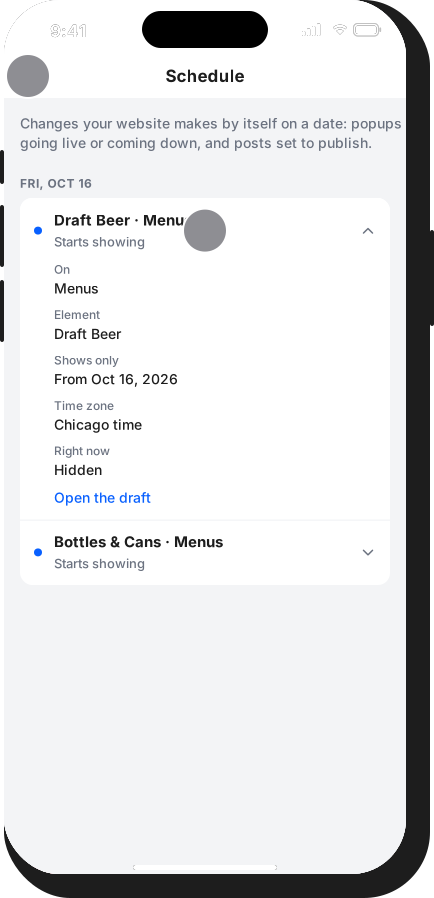
Schedule pop-ups, slider slides, banners and specials to appear and disappear on their own: happy hour on Fridays, brunch on weekends, holiday hours the week of. The Schedule tab shows exactly what will change on your site, and when.
What you can do
Your whole website, in your pocket.
Menus
Prices, dishes, descriptions, dietary tags, calories, sold-out items, and happy-hour and seasonal schedules.
Hours and locations
Weekly hours, holiday closures, addresses, phone numbers and links.
Photos
Take or choose a picture and it's optimized and added right where you want it.
Pages and promotions
Text, buttons, slider slides, pop-ups and more, shown or hidden on a schedule.
Blog and search
Posts written in your restaurant's voice, plus better search titles and descriptions.
Inbox
Catering requests, job applications and other form entries from your website in one place.
Team approvals
Your team can ask for changes, and owners approve them, with notifications.
Schedule
See everything that will change on your website, and when it will happen.
Talk instead of type
Dictate your request, or share photos and files straight into Webdiner from other apps.
You stay in control
AI does the work. You make the call.
Webdiner never publishes anything on its own. Every change waits for your approval, can be undone, and is recorded so you always know who changed what. Our AI provider does not use your content to train its models. Read our Privacy Policy.
Nothing goes live without you
Every change shows up as an approval card first.
Undo any change
Put things back with a tap.
A full activity history
See every change, when it happened and who asked for it.
Backed by real people
For bigger projects, your Webdiner team is a message away.
Questions
AI Website Control FAQs
Who can use the Webdiner app?
The app is for restaurants and hospitality businesses whose website is built and run by Webdiner. We set up your account when you become a client. Not a client yet? Get started below.
Will it change my website without asking?
Never. Webdiner prepares each change and shows you exactly what will be different. Nothing goes live until you approve it, and every change can be undone.
Can my managers and staff use it?
Yes. Team members can ask for changes, and owners approve what their team asks for, with notifications so nothing slips through.
Can I schedule changes ahead of time?
Yes. Schedule menus, pop-ups, slides and promotions to appear and disappear on their own, and see everything coming up in the Schedule tab.
What devices does it work on?
Webdiner works on iPhone and in your web browser.
Is my information private?
Your messages, photos and files are used only to make the changes you ask for. Our AI provider does not use them to train AI models, and we never sell your data. See our Privacy Policy for details.
The future of your website
Stop waiting on website updates.
Get a custom Webdiner website with AI Website Control built in. Plans start at $99 per month.